Federated Credential Management (FedCM)
Overview
Federated Credential Management (FedCM) is a web API and standard that allows users to sign in to websites using their federated identity providers (IdPs). It aims to provide a more secure and privacy-preserving way for users to authenticate with third-party services.
When FedCm is set up, users will see a browser prompt asking them to use their federated identity provider to sign in to the website:
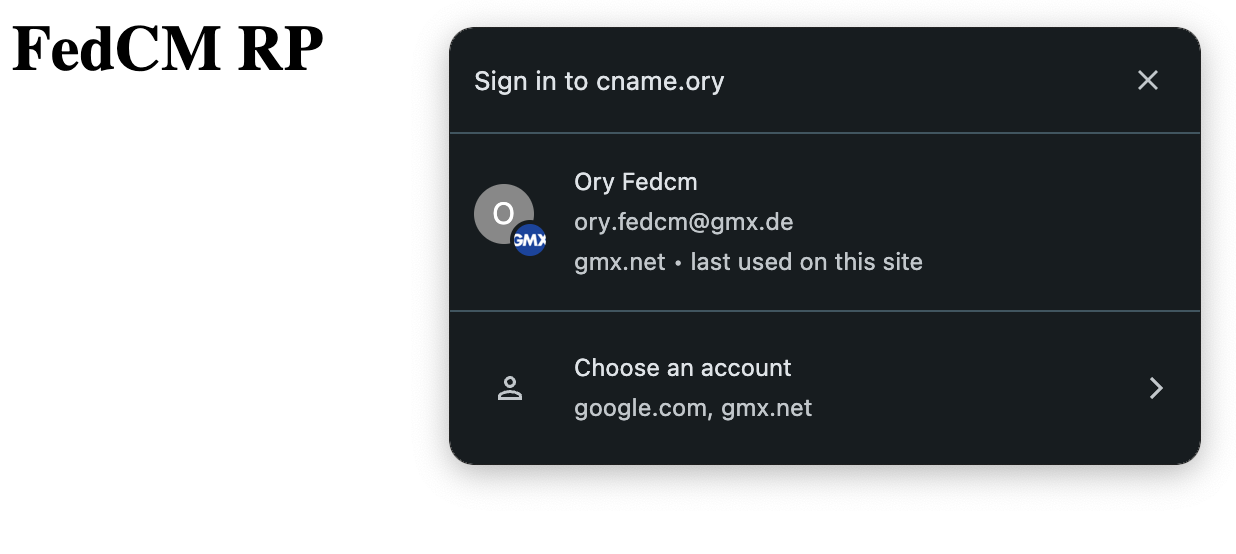
Why FedCM?
FedCM is a great way to improve the login experience for your users. It allows them to sign in to your website using their existing IdP, from any content site you embed the FedCM script on. Making it easier for users to sign in can increase user trust and conversion rates.
Because the FedCM script needs to communicate with the Ory APIs, you need to create a custom domain and enable CORS requests to it from your content sites.
How It Works
- Fetching Parameters: Your website requests the FedCM parameters from the Ory APIs.
- User Initiates Sign-In: The user clicks a "Sign in with [IdP]" button on your website.
- FedCM API Call: The user's browser uses the FedCM API to request an identity assertion from the IdP.
- User Consent: The browser prompts the user to consent to sharing their identity with the relying party.
- Identity Assertion: The IdP provides an identity assertion to your website.
- Authentication, Session issuance: Your website submits the identity assertion to the Ory APIs to create an identity and session.
Setup
Configuration of the SSO providers
To set up FedCM, navigate to Authentication → Social Sign-In (OIDC) in the Ory Console and set up a new social sign-in provider. FedCM is
currently only supported for Google and NetID. Aside from the standard social sign-in configuration, you need to provide a
FedCM Config URL for the IdP. For NetID, additionally supply the FedCM Token Exchange Origin Header, which must be one of the
origin_uris of the NetID client.
FedCM is part of social sign-in. While social sign-in is disabled, /self-service/fed-cm/parameters and
/self-service/fed-cm/token respond with 404 Not Found.
Configuration of the custom domain
In order to use FedCM with the Ory Network, it is necessary to expose the Ory Network APIs on a custom domain. To set up, navigate to Branding → Custom domains in the Ory Console and add a new custom domain. Make sure that you enable CORS, and that each origin you want to use FedCM from is added to the list of allowed origins.
Embedding the FedCM script
Next, embed the following script on each page you want to use FedCM on. In the script, replace <YOUR CUSTOM ORY DOMAIN> with the
custom domain you created in the previous step.
const oryUrl = "https://<YOUR CUSTOM ORY DOMAIN>"

async function signInWithFedCM() {
  // Fetch the OIDC provider configuration from the Ory Network.
  // This will only include providers for which the FedCM config URL is set.
  // Fetch it immediately before the sign-in attempt: each response carries
  // single-use nonces that expire with the login flow lifespan.
  const parameters = await (
    await fetch(`${oryUrl}/self-service/fed-cm/parameters`, {
      credentials: "include",
    })
  ).json()

  // Request an identity assertion from the user's browser.
  // Prior to the call, you can sort or filter this list if needed.
  const { token } = await navigator.credentials.get({
    identity: {
      providers: parameters.providers.map((p) => ({
        configURL: p.config_url,
        clientId: p.client_id,
        nonce: p.nonce,
      })),
    },
  })

  // Submit the identity assertion to the Ory Network.
  // This will log in or register the user and issue a session.
  return await fetch(`${oryUrl}/self-service/fed-cm/token`, {
    credentials: "include", // necessary to send the CSRF cookie
    method: "POST",
    headers: { "Content-Type": "application/json" },
    body: JSON.stringify({
      token,
      csrf_token: parameters.csrf_token, // necessary to prevent CSRF attacks
    }),
  })
}

async function nonceWasRejected(response) {
  if (response.status !== 400) return false
  try {
    return (await response.clone().json())?.error?.id === "fedcm_nonce_rejected"
  } catch {
    return false
  }
}

;(async () => {
  if (!("IdentityCredential" in window)) return

  let response = await signInWithFedCM()

  // Retry once with fresh parameters if the nonce was no longer acceptable.
  if (await nonceWasRejected(response)) {
    response = await signInWithFedCM()
  }
})()
Use FedCM on pages with third-party scripts
If the page that calls FedCM also loads scripts that you don't control, such as ads, mark its origin as a
restricted origin. A successful POST /self-service/fed-cm/token from that origin
still sets the session cookie, but the response contains only the session ID and whether it's active:
{
  "session": {
    "id": "11111111-1111-4111-8111-111111111111",
    "active": true
  },
  "continue_with": [
    {
      "action": "redirect_browser_to",
      "redirect_browser_to": "https://app.example.com/"
    }
  ]
}
A first-time sign-up also omits the top-level identity. Read identity data on your server instead.
Nonces
Each entry in the parameters response carries a nonce. Ory issues a new one for every request and binds it to the browser that
asked for it. Build your integration to these rules:
- One nonce, one sign-in. Never reuse a
parametersresponse, and never submit the same identity assertion twice. - One browser, one nonce. Redeem a nonce only in the browser that fetched it. Do not fetch parameters on your server or share a response between users.
- Nonces expire after the login flow lifespan (
selfservice.flows.login.lifespan, 30 minutes by default). Fetch the parameters immediately before callingnavigator.credentials.getrather than when the page loads, or raise the lifespan if your pages are long-lived.
Handle a 400 whose error id is fedcm_nonce_rejected by fetching new parameters and repeating navigator.credentials.get, as
shown above.
The identity provider must return the nonce in the nonce claim of the identity assertion. Google and NetID both do.
Browser support
Since FedCM is a relatively new standard, browser support is limited to Chrome, Edge and Opera. Firefox and Safari do not yet support FedCM.